
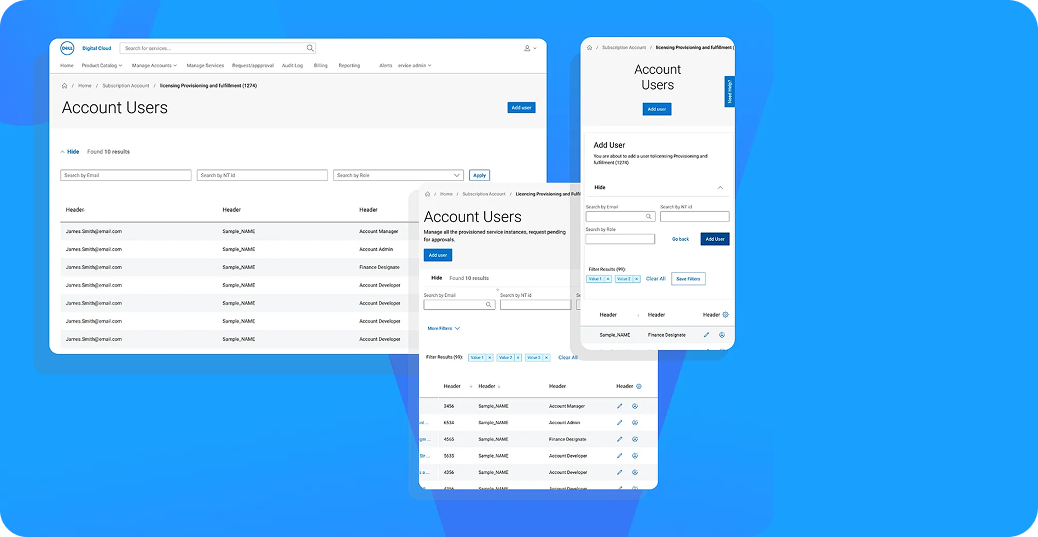
Atomic Design System in Enterprise Cloud Services: Dell Cloud Service
Introduction
In cloud-based SaaS products serving at an enterprise scale, user experience is not just an aesthetic choice; it is a critical component for operational efficiency, learnability, and product continuity. Especially in systems containing numerous modules, user roles, and authorization structures, inconsistent interfaces directly increase error rates and development costs.
This article discusses how rapid development, scalability, and experience consistency were achieved with the Atomic Design approach in a SaaS application developed within the scope of Dell Cloud Service.
Problem Definition: Complexity in Enterprise SaaS
Products like Dell Cloud Service often harbor high complexity:
- Multiple User Roles: Admin, Manager, Finance, Developer, etc.
- Licensing: Management of different license and subscription models.
- Data Density: Detailed account, user, and resource management screens.
- Access: Expectation of desktop and mobile access.
This complexity creates the following risks for design and development teams:
- UI inconsistencies.
- Repetitive development effort (Code duplication).
- Prolonged release times.
- Increased learning cost on the user side.
The solution has been to establish a systematic design infrastructure rather than producing individual screens.
Atomic Design System Approach
The application is structured based on Brad Frost’s Atomic Design methodology.
1. Atoms
These are the smallest building blocks of the system:
- Buttons, Input fields, Labels, Icons, and Status indicators (loading, error, success).
These atoms are defined with design tokens (color, spacing, typography), coded to comply with accessibility (WCAG) criteria, and to behave standardly across all platforms.
2. Molecules
Functional components formed by the combination of atoms:
- Search bars, Filter areas, Table headers, Inline actions.
For example; search and filtering areas on the "Account Users" screen are designed as molecules reusable in different modules.
3. Organisms
Larger building blocks with which users interact directly:
- User lists, Role and permission tables, Form and modal structures.
The goal at this level is to enable module-based flexibility while maintaining functional consistency.
4. Templates and Pages
At the final stage, organisms are brought together to create responsive templates compatible with Desktop, Tablet, and Mobile scenarios. This structure has significantly shortened new module development times.
Rapid Development and Scalability
Thanks to the atomic design system:
- New screens could be created "like LEGO" with combinations of existing components.
- Frontend and UX teams communicated over the same “design language”.
- The need for refactor was minimized.
These gains have directly and positively affected the product's Time-to-Market.
Technical Architecture and Design System Integration
Example Tech Stack
-
Frontend
- React
- TypeScript
- Component-driven development (Storybook)
-
Design System
- Centralized Design Tokens
- Versionable UI Library
- Automated Documentation
-
Backend Integration
- Role and permission-based dynamic UI rendering.
- Feature flag and permission management.
Thanks to this structure, the design system has become a living product component, not just a visual guide.
Enterprise User Experience Perspective
For enterprise users, the success metric is "completing the job without error" rather than "quick learning".
Therefore, elements prioritized in the interface:
- Clear Hierarchy: Scannability of information.
- Predictable Interactions: Standard behaviors.
- Clear Feedback: Instant understanding of system status by the user.
Conclusion
This SaaS application developed for Dell Cloud Service offers a consistent, scalable, and developable product experience with the atomic design system approach.
This approach has created a sustainable design and technology infrastructure that supports not only today's needs but also the future growth of the product.